A Telegram bot that creates presentations from a voice note is a real n8n pattern — not a demo GIF. I shipped one for a medical practice: voice in, structured slides out. This post is the architecture, the failure modes, and the line between a custom bot and a packaged stack.
The live build is the n8n Telegram voice-to-PowerPoint project. If you actually need email, CRM and files on a server you own, that is a different product — the SaaS cost calculator.
What the workflow actually does
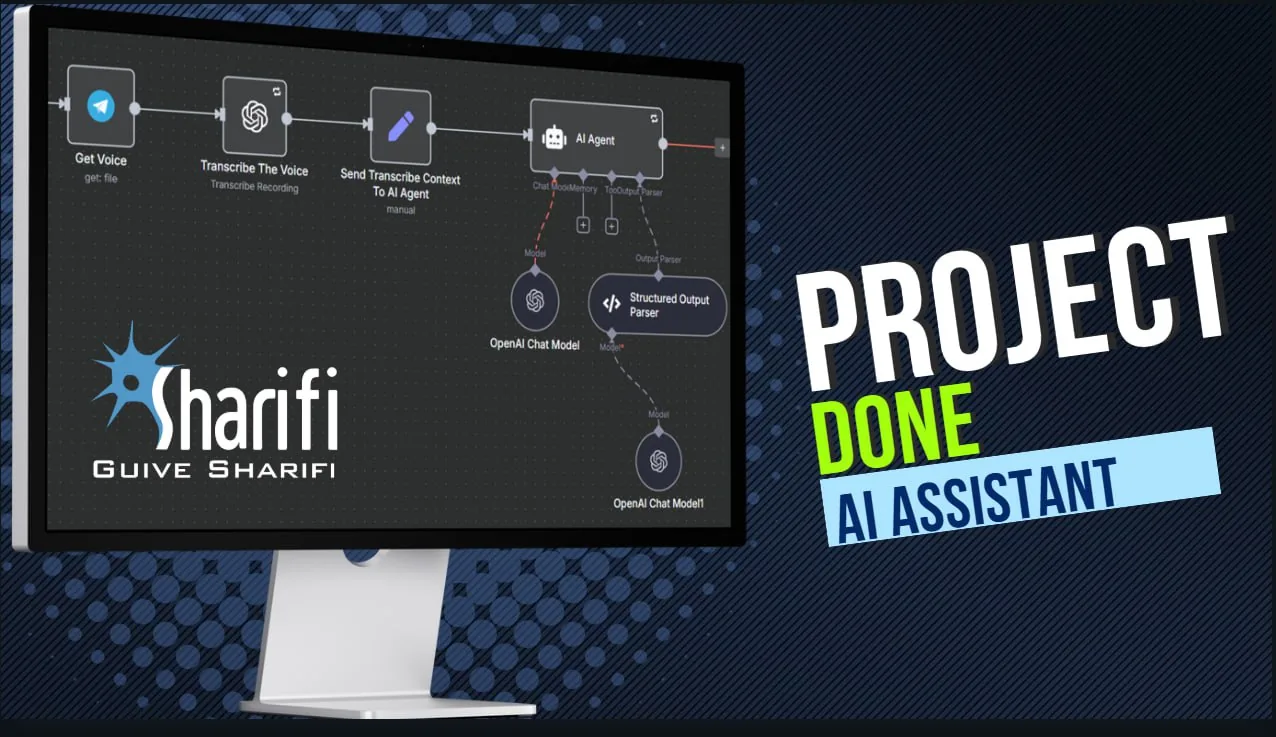
A user sends a voice message in Telegram, in any language. n8n catches it, OpenAI transcribes it, an agent extracts fields (patient details, clinical notes, whatever the template expects), a Google Slides master is copied and filled, then PowerPoint and PDF links come back in the same chat.
Images are a second channel. Case photos arrive as separate Telegram messages, land in Google Drive, and get tracked in Sheets so the deck and the files stay aligned. That is the part most “voice to slides” tutorials skip.
Architecture, in five hops
- Telegram trigger — voice, text captions, and photo messages. The workflow has to wait and correlate, not fire a half-built deck on the first packet.
- Transcription — OpenAI speech-to-text. Language is not assumed. Bad audio still produces confident nonsense; a human has to be able to reject the draft.
- Structured extraction — an AI node maps free speech onto a schema. If a field is missing, the bot should ask, not invent.
- Slide assembly — copy a Google Slides template, write fields, attach Drive images, export PPTX and PDF.
- Delivery — send download links back in Telegram. Do not email a 40 MB attachment through a mailbox you do not control.
n8n is the orchestrator. Telegram is the UI. Google is the document store. OpenAI is the speech and extraction layer. None of those are optional in this design; swapping one means redesigning the wait states.
Limits you should budget for
- Multi-message state. A case is rarely one voice bubble. You need session memory (Sheets, a data store, or n8n static data with a TTL) or you will mix Patient A’s photos into Patient B’s deck.
- API quotas and cost. Transcription plus extraction on every note is not free. A clinic that dictates twenty cases a day will feel Whisper and GPT bills before they feel n8n hosting.
- Template brittleness. Google Slides placeholders break when someone “improves” the master. Version the template; do not let staff edit the live master.
- PHI and retention. A medical voice note is health data. Telegram, Drive, and OpenAI each have a different retention story. If you cannot explain where the audio lives after the job, do not build this for a clinic.
- Telegram is a terrible CMS. Long edits, versioning, and “make slide 4 landscape” do not belong in chat. The bot drafts; a human opens the PPTX.
When you should not build this bot
Do not start here if the real pain is per-seat Google Workspace, HubSpot and Zapier. A custom Telegram bot will not cancel those invoices. Run the SaaS cost calculator, then decide whether you want the Mailcow / SuiteCRM / Mautic / Nextcloud / n8n package or a scoped workflow.
Do not start here if the team still pastes cases into WhatsApp and a shared drive with no naming convention. Automation copies chaos faster.
Do not start here if you need a public “AI presentation maker” SaaS. This pattern is a private bot with a known template and a known user list.
What I would scope in a new build
Keep the five hops. Replace Google Slides with a branded PPTX library only if Drive is politically impossible. Add an explicit “looks wrong — redo” callback in Telegram so the transcription error does not become a patient-facing slide. Log every run with the Telegram user id, template version, and token cost.
If you want this class of bot, see the shipped project and get in touch. If you want the whole stack instead, start with the calculator.
Frequently asked questions
Can a Telegram bot create PowerPoint presentations from voice notes?
Yes. n8n transcribes the voice message, extracts fields, fills a Slides template, and returns PPTX and PDF links in Telegram. It is a workflow, not a magic button.
Is this the same as the one-time self-hosted stack?
No. The calculator is Mailcow, SuiteCRM, Mautic, Nextcloud and n8n on your server. This bot is custom n8n for one job. You can buy either, or both.
How long does a build like this take?
The shipped version was about two weeks with a known template and a single Telegram bot. Ambiguous fields, messy image intake, or a compliance review will stretch that.

Systems & Automation Specialist
Alec Asgari is a systems and automation specialist with experience in CRM implementation, workflow automation, and cross-functional process design. He writes about organizational strategy, technology, and operational execution.